
How Many Slides for a 10-Minute Presentation?
IN
Visual Communication
Most 10-minute presentations need 8 to 13 slides, but purpose and slide density matter more than any rule. Here's how to let your story set the count.

Written by
David Taylor
The short answer
For most 10-minute presentations, 8 to 13 slides works well. That's the range you get when you build your slides around a simple story: the problem, the struggle, the turning point and what happens next.
The honest answer, though, is "it depends". A 10-minute data deep dive might need only three or four slides. A 10-minute pitch built on bold images could easily carry 25 or more.
The number of slides isn't a target to hit. It's the result of three decisions: what the presentation is for, how much each slide carries, and the story you're telling.

Why "one slide per minute" is the wrong place to start
The advice you'll see most often is one slide per minute, so ten slides for ten minutes. It's easy to remember, which is why it's everywhere.
The problem is that it treats every slide as equal. A slide with one photograph and three words might be on screen for 15 seconds. A slide with a detailed chart might hold the room for three minutes. An average of the two tells you nothing useful about how to build your deck.
So instead of counting minutes, start with what you're trying to achieve.
Start with what the presentation is for
The type of presentation, and the information you need to get across, has the biggest effect on your slide count.
Explaining something complex
If it's a deep dive into a technical topic or a walk through your data, you may spend a long time on a single slide. Your audience needs time to take in a chart, get their bearings and follow your explanation.
Here, fewer slides is usually better. Three to six slides can fill ten minutes comfortably, with each one doing serious work. If a slide is dense, build it up in stages so the audience sees one point at a time.

Persuading or changing minds
If your goal is to win support for an idea, persuade a group or change hearts and minds, the detail matters less than the momentum. Your slides are there to support what you say, not to say it for you.
In this kind of presentation, the number of slides depends almost entirely on how much you put on each one.
Slide density sets the pace
The less text on a slide, the faster you can move through it. If you keep your slides light on words and heavy on images, and sometimes use an image on its own, you can get through a lot of slides in ten minutes without rushing.
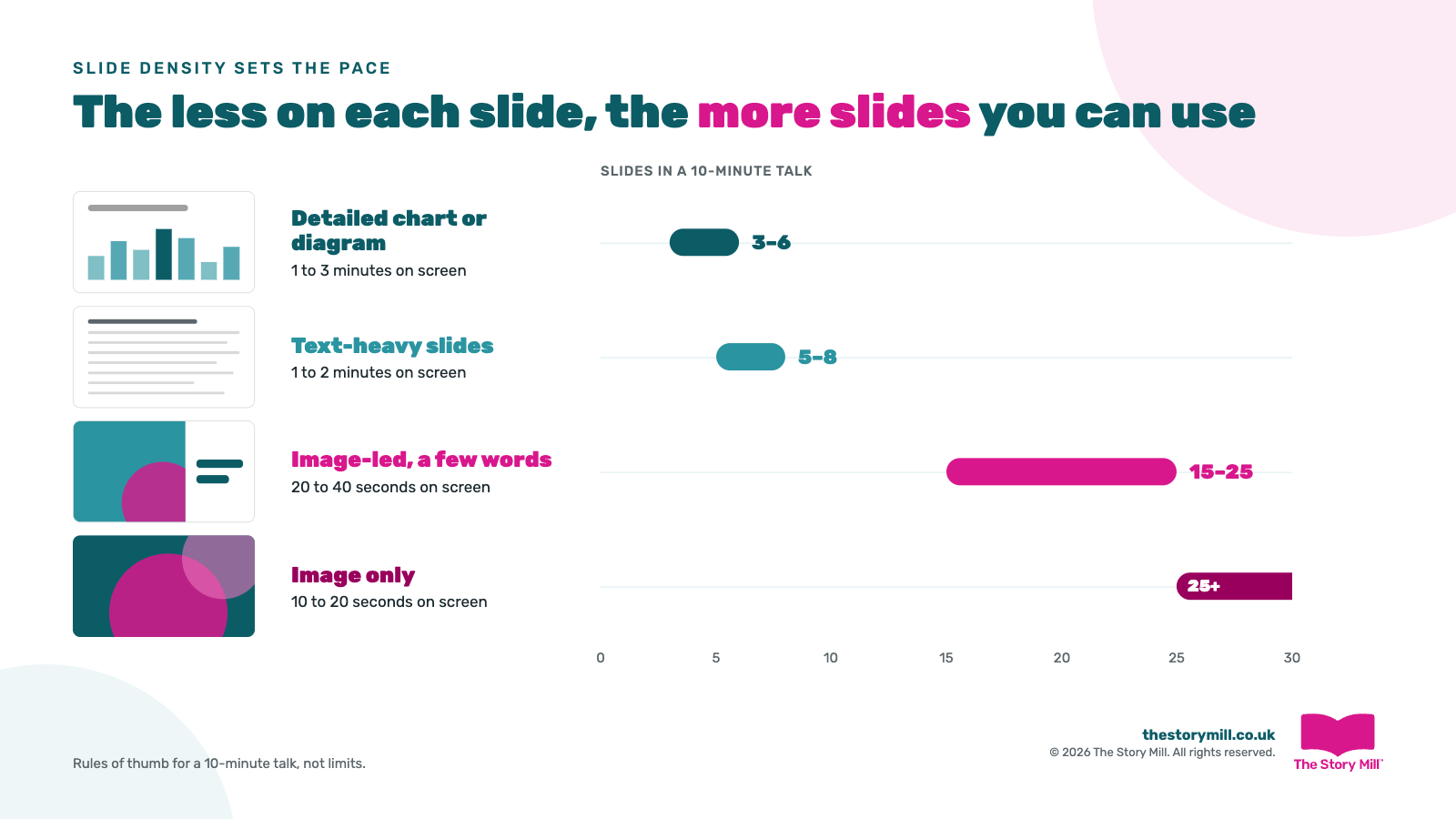
- Detailed chart or diagram: 1 to 3 minutes on screen, so roughly 3 to 6 slides in 10 minutes
- Text-heavy (bullets, paragraphs): 1 to 2 minutes, roughly 5 to 8 slides
- Image-led, a few words: 20 to 40 seconds, roughly 15 to 25 slides
- Image only: 10 to 20 seconds, 25 slides or more
These are rules of thumb, not limits. The point is that a fast run of simple, visual slides keeps the energy up, while a text-heavy slide slows everything down. If your slides are full of text, your audience reads instead of listening, so cut the words rather than adding time.
Let your story decide the number
The most useful approach is not to fill ten minutes with slides at all. Instead, use your slides to reinforce the key moments in your story. A simple four-part shape works well for a 10-minute talk:

- Set up the problem (2 to 3 slides, about 2 minutes): show the situation and what's at stake if nothing changes.
- The struggle (3 to 4 slides, 3 to 4 minutes): show the obstacles, what's been tried and why it hasn't worked.
- The turning point (1 to 3 slides, 2 to 3 minutes): reveal the insight, idea or solution that changes things.
- Next actions and close (2 to 3 slides, 1 to 2 minutes): make the ask clear and leave a final image or line that sticks.
That's 8 to 13 slides in ten minutes.
Notice that the struggle gets the most slides. That's where tension builds and the audience leans in, so it's worth the time. The turning point often lands best with just one strong slide.
Between key moments, you don't always need a slide at all. A blank or black slide brings attention back to you, which is often exactly where it should be. For more on making each slide work harder, see our guide to visual storytelling.
What about 5, 15, 20 or 30-minute presentations?
The same thinking applies to any length: stretch or squeeze the story, then let purpose and density adjust the count. As a starting point for a story-led deck:
- 5 minutes: 4 to 7 slides. One slide each for the problem and turning point, a short struggle, one closing slide.
- 10 minutes: 8 to 13 slides. The four-part structure above.
- 15 minutes: 12 to 18 slides. More room in the struggle for evidence and examples.
- 20 minutes: 15 to 25 slides. Add a second example or a short story within the struggle.
- 30 minutes: 20 to 35 slides. Consider two or three smaller stories, each with its own turning point.
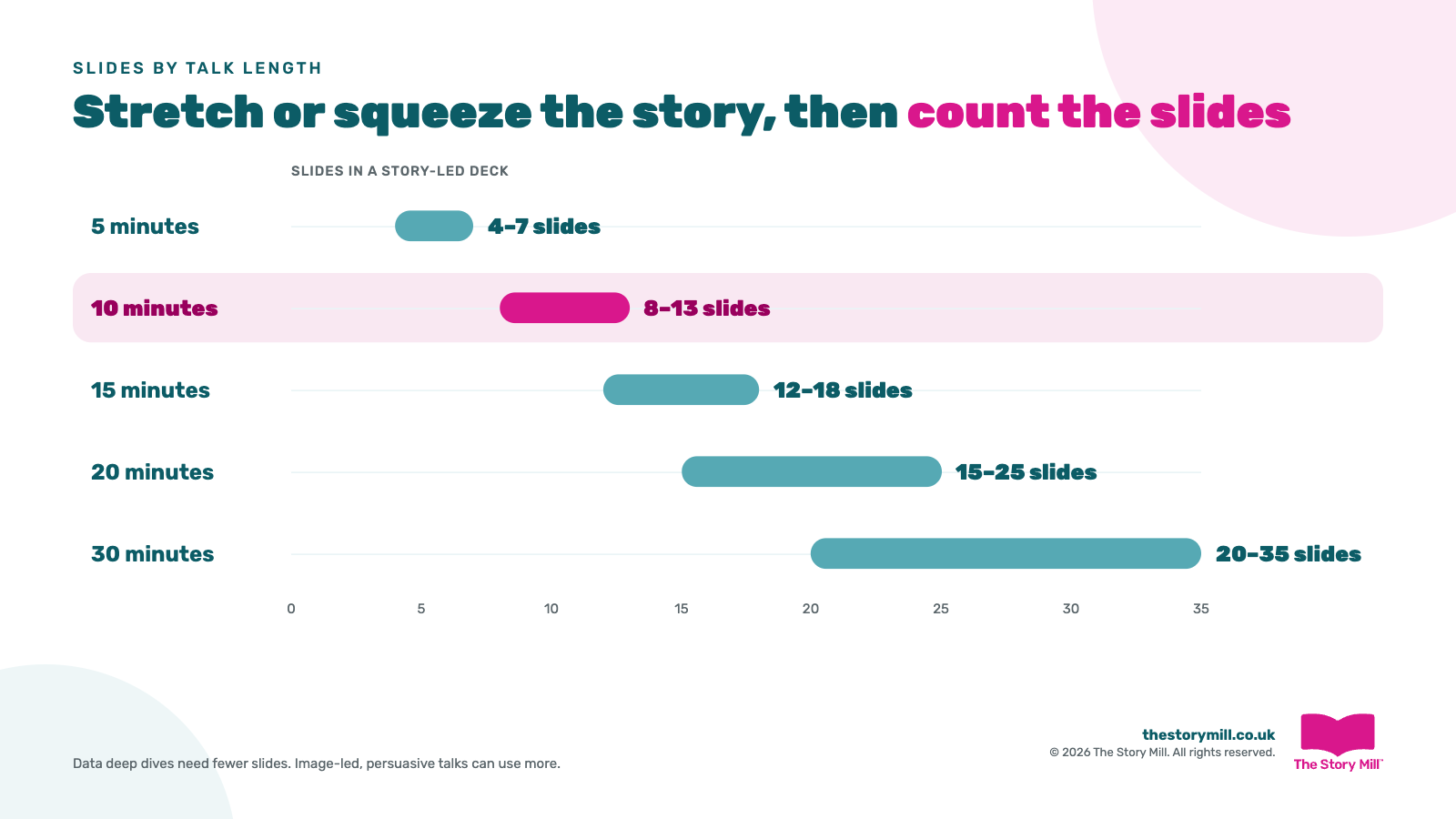
For a data deep dive, expect fewer slides than this. For an image-led, persuasive talk, you could comfortably use more. For anything 45 minutes or longer, break the talk into chapters, each with its own mini story.
What about the 10/20/30 rule?
You may have come across Guy Kawasaki's 10/20/30 rule: 10 slides, 20 minutes, and no font smaller than 30 point. He designed it for start-ups pitching to investors, and it's a good discipline for that setting.
The part worth keeping for any presentation is the 30-point font. If your text has to be that big, there simply isn't room for paragraphs, and your slides become easier to take in. Just don't treat 10 slides as a magic number. Your story and purpose should decide that.
Before you build your deck
- Write the story first. Know your problem, struggle, turning point and ask before you open PowerPoint.
- Decide what the presentation is for. Explaining something complex means fewer, richer slides. Persuading means lighter, faster ones.
- Choose your density. The less text on each slide, the more slides you can use.
- Map slides to key moments. Give each story stage its slides and leave the rest of the time to you.
- Rehearse against the clock. If you run over, cut slides, not your story.

The right number of slides is the number that helps your audience follow your story, and not one more.
If your team presents to win business, secure budget or bring people with them, our presentation skills training shows them how to build presentations around a story that sticks. Get in touch to find out how it works.



Subscribe to The Story Mill Blog
Get the latest business storytelling and visual communications news, tips/advice & resources
Thanks for subscribing. Please check your email to confirm your subscription.
Oops! Something went wrong while submitting the form.